Python turtle で時計
文字盤は 1 回だけ描き、針は毎秒消して描き直します。あなたの端末の時刻どおりに動きます。
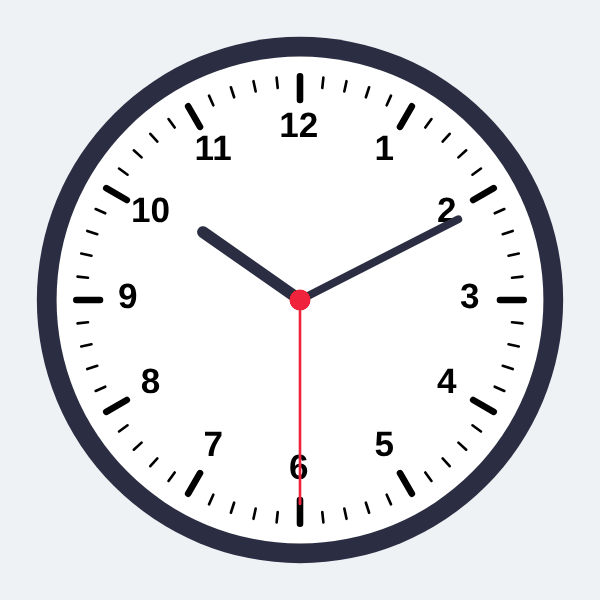
コード全体(60 行)
import turtle
import datetime

screen = turtle.Screen()
screen.bgcolor("#eef2f5")
screen.tracer(0)
face = turtle.Turtle()
face.hideturtle()
face.penup()

# 文字盤
face.goto(0, 0)
face.dot(400, "#2b2d42")
face.dot(370, "white")
# 目盛り 60 本、時の目盛りは長く太く
for i in range(60):
    face.goto(0, 0)
    face.setheading(90 - i * 6)
    face.forward(170)
    face.pendown()
    face.pensize(5 if i % 5 == 0 else 2)
    face.forward(-18 if i % 5 == 0 else -8)
    face.penup()
# 数字
for h in range(1, 13):
    face.goto(0, 0)
    face.setheading(90 - h * 30)
    face.forward(130)
    face.sety(face.ycor() - 12)
    face.write(str(h), align="center", font=("Arial", 20, "bold"))

hands = turtle.Turtle()
hands.hideturtle()


def hand(angle, length, width, color):
    hands.penup()
    hands.goto(0, 0)
    hands.setheading(90 - angle)
    hands.pendown()
    hands.pencolor(color)
    hands.pensize(width)
    hands.forward(length)


def tick():
    now = datetime.datetime.now()
    hands.clear()
    hand((now.hour % 12 + now.minute / 60) * 30, 90, 9, "#2b2d42")
    hand((now.minute + now.second / 60) * 6, 135, 6, "#2b2d42")
    hand(now.second * 6, 155, 2, "#ef233c")
    hands.penup()
    hands.goto(0, 0)
    hands.dot(16, "#ef233c")
    screen.update()
    screen.ontimer(tick, 1000)


tick()
turtle.done()
どうやって描いているか
カメは 2 匹です。face が文字盤、目盛り、数字を 1 回だけ描き、hands が針を描いて、毎秒 hands.clear() で消します。
時計は 12 から右回りですが、turtle の 0 度は右向きで左回りなので、向きは 90 - 角度 です。秒針は 1 秒に 6 度、長針は 1 分に 6 度、短針は 1 時間に 30 度進みます。
datetime.datetime.now() で今の時刻を取り、短針には minute / 60 も足します。3 時半なら短針は 3 と 4 の間になります。
screen.ontimer(tick, 1000) で 1 秒後にまた tick を呼ぶと、時計が動き出します。
よくある質問
このページでずっと動きますか?
このページでは 30 秒で止まります。自分のパソコンではウィンドウを閉じるまで動き続けます。
針に別のカメを使うのはなぜ?
clear() はそのカメが描いたものだけを消します。針を別のカメにすれば、針を消しても文字盤は消えません。
 花火1 コマずつ描くアニメーション
 陰陽マーク半円 3 つで S の形
 スピログラフ3 つの数で無限の模様
 雪の結晶どんどん細かくなるコッホ曲線