Python 畫時鐘
錶盤只畫一次,指標每秒擦掉重畫一次,跟著你電腦上的時間走。
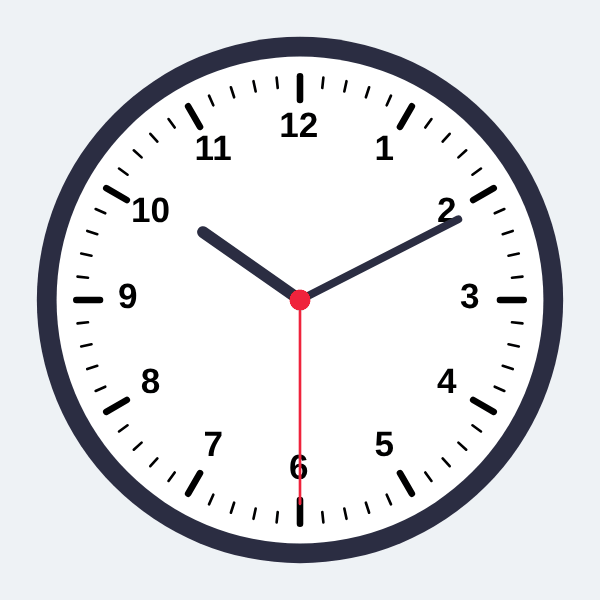
完整程式碼(60 行)
import turtle
import datetime

screen = turtle.Screen()
screen.bgcolor("#eef2f5")
screen.tracer(0)
face = turtle.Turtle()
face.hideturtle()
face.penup()

# 錶盤
face.goto(0, 0)
face.dot(400, "#2b2d42")
face.dot(370, "white")
# 刻度:60 個,整點的長一點粗一點
for i in range(60):
    face.goto(0, 0)
    face.setheading(90 - i * 6)
    face.forward(170)
    face.pendown()
    face.pensize(5 if i % 5 == 0 else 2)
    face.forward(-18 if i % 5 == 0 else -8)
    face.penup()
# 數字
for h in range(1, 13):
    face.goto(0, 0)
    face.setheading(90 - h * 30)
    face.forward(130)
    face.sety(face.ycor() - 12)
    face.write(str(h), align="center", font=("Arial", 20, "bold"))

hands = turtle.Turtle()
hands.hideturtle()


def hand(angle, length, width, color):
    hands.penup()
    hands.goto(0, 0)
    hands.setheading(90 - angle)
    hands.pendown()
    hands.pencolor(color)
    hands.pensize(width)
    hands.forward(length)


def tick():
    now = datetime.datetime.now()
    hands.clear()
    hand((now.hour % 12 + now.minute / 60) * 30, 90, 9, "#2b2d42")
    hand((now.minute + now.second / 60) * 6, 135, 6, "#2b2d42")
    hand(now.second * 6, 155, 2, "#ef233c")
    hands.penup()
    hands.goto(0, 0)
    hands.dot(16, "#ef233c")
    screen.update()
    screen.ontimer(tick, 1000)


tick()
turtle.done()
怎麼畫的
兩隻海龜:face 畫表盤、刻度和數字,只畫一次;hands 畫指標,每秒 hands.clear() 擦掉重畫。
鐘錶從 12 點開始順時針走,turtle 的 0 度朝右、逆時針為正,所以方向是 90 - 角度。秒針每秒 6 度,分針每分鐘 6 度,時針每小時 30 度。
datetime.datetime.now() 取現在的時間;時針還要加上 minute / 60,到 3 點半時針才會在 3 和 4 中間。
screen.ontimer(tick, 1000) 一秒後再呼叫 tick,鍾就走起來了。
常見問題
這一頁上鍾會一直走嗎?
這一頁上動畫放 30 秒後停住;在自己電腦上執行會一直走,關窗口才停。
為什麼指標要用另一隻海龜?
clear() 只擦掉這隻海龜自己畫的。指標單獨一隻海龜,擦指標時錶盤不會被擦掉。
 跨年煙花會動的煙花:一幀一幀畫
 滿天星漸變夜空和會閃的星星
 太極圖三段半圓彎出 S 形
 繁花曲線三個數,無窮的花樣