Python turtle でクリスマスツリー
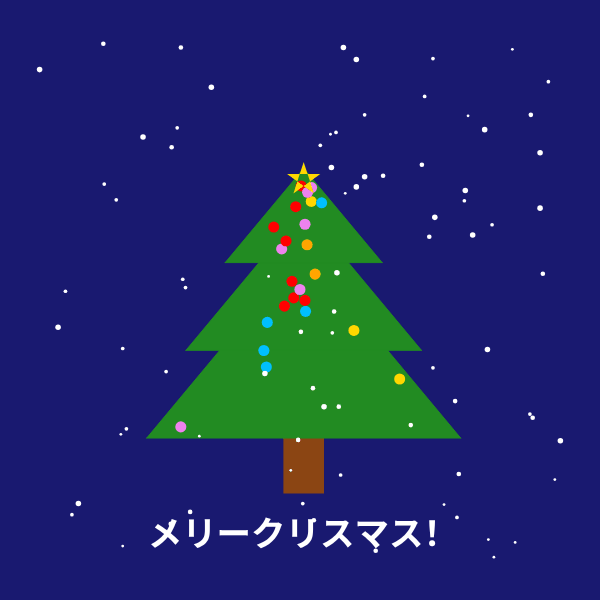
3 段の葉、電飾、てっぺんの星、まわりの雪。数字を変えて、できあがったら持ち帰りましょう。
コード全体(69 行)
import turtle
import random

screen = turtle.Screen()
screen.bgcolor("midnightblue")
t = turtle.Turtle()
t.hideturtle()
t.speed(0)


def triangle(bottom, width, color):
    # 葉っぱの 1 段:底辺の高さが `bottom`、幅が `width`
    t.penup()
    t.goto(-width / 2, bottom)
    t.pendown()
    t.color(color)
    t.begin_fill()
    t.goto(width / 2, bottom)
    t.goto(0, bottom + width * 0.6)
    t.goto(-width / 2, bottom)
    t.end_fill()


# 幹
t.penup()
t.goto(-22, -210)
t.color("saddlebrown")
t.begin_fill()
for side in [44, 60, 44, 60]:
    t.forward(side)
    t.left(90)
t.end_fill()

# 3 段、上の段ほど小さく
layers = 3
for i in range(layers):
    triangle(-150 + i * 95, 340 - i * 85, "forestgreen")

# 飾りの電球:各段の内側につるす
colors = ["red", "gold", "deepskyblue", "orange", "violet"]
for i in range(layers):
    bottom = -150 + i * 95
    width = 340 - i * 85
    for k in range(8):
        h = random.uniform(10, width * 0.6 - 12)
        half = width / 2 * (1 - h / (width * 0.6))
        t.penup()
        t.goto(random.uniform(-half + 8, half - 8), bottom + h)
        t.dot(12, random.choice(colors))

# てっぺんの星
top = -150 + (layers - 1) * 95 + (340 - (layers - 1) * 85) * 0.6
t.goto(-18, top - 6)
t.setheading(0)
t.color("gold")
t.begin_fill()
for i in range(5):
    t.forward(36)
    t.right(144)
t.end_fill()

# 雪
for i in range(80):
    t.goto(random.randint(-300, 300), random.randint(-280, 280))
    t.dot(random.randint(3, 6), "white")

t.goto(0, -275)
t.color("white")
t.write("メリークリスマス!", align="center", font=("Arial", 28, "bold"))
どうやって描いているか
葉の 1 段は塗りつぶした三角形です。triangle(底辺の高さ, 幅, 色) が begin_fill() と end_fill() の間で 3 辺をたどり、中を塗ります。
for ループで段を描きます。1 段上がるごとに 95 高く、85 細くなります。
電飾は三角形の内側につけます。高さ h を乱数で選び、その高さでの三角形の幅 half を計算して、その幅の中に点を打ちます。
t.write("メリークリスマス!", align="center", font=("Arial", 28, "bold")) でカメの位置を中心に文字を書きます。
よくある質問
メッセージを変えたり名前を入れたりするには?
「編集」をタップし、エディタで write(...) の中の文字を変えて実行し直します。
星の真ん中が空いているのはなぜ?
turtle(Tk)は偶奇規則で塗るので、星の真ん中は 2 回囲まれて塗られません。本物の Python も同じで、このページも同じように描きます。
 雪の結晶どんどん細かくなるコッホ曲線
 花火1 コマずつ描くアニメーション
 ハート半円 2 つでできたハート
 桜の木再帰で育つ、毎回ちがう木