Python 圣诞树代码
三层树叶、彩灯、树顶的星星和满天的雪。点数字改层数和彩灯,改好了带走送人。
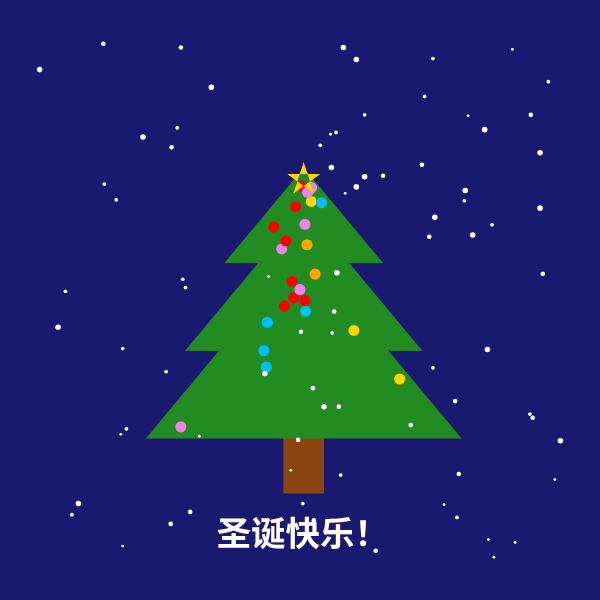
完整代码(69 行)
import turtle
import random

screen = turtle.Screen()
screen.bgcolor("midnightblue")
t = turtle.Turtle()
t.hideturtle()
t.speed(0)


def triangle(bottom, width, color):
    # 一层树叶:底边在 bottom,宽 width
    t.penup()
    t.goto(-width / 2, bottom)
    t.pendown()
    t.color(color)
    t.begin_fill()
    t.goto(width / 2, bottom)
    t.goto(0, bottom + width * 0.6)
    t.goto(-width / 2, bottom)
    t.end_fill()


# 树干
t.penup()
t.goto(-22, -210)
t.color("saddlebrown")
t.begin_fill()
for side in [44, 60, 44, 60]:
    t.forward(side)
    t.left(90)
t.end_fill()

# 三层树叶,一层比一层小
layers = 3
for i in range(layers):
    triangle(-150 + i * 95, 340 - i * 85, "forestgreen")

# 彩灯:挂在每一层里面
colors = ["red", "gold", "deepskyblue", "orange", "violet"]
for i in range(layers):
    bottom = -150 + i * 95
    width = 340 - i * 85
    for k in range(8):
        h = random.uniform(10, width * 0.6 - 12)
        half = width / 2 * (1 - h / (width * 0.6))
        t.penup()
        t.goto(random.uniform(-half + 8, half - 8), bottom + h)
        t.dot(12, random.choice(colors))

# 树顶的星星
top = -150 + (layers - 1) * 95 + (340 - (layers - 1) * 85) * 0.6
t.goto(-18, top - 6)
t.setheading(0)
t.color("gold")
t.begin_fill()
for i in range(5):
    t.forward(36)
    t.right(144)
t.end_fill()

# 雪
for i in range(80):
    t.goto(random.randint(-300, 300), random.randint(-280, 280))
    t.dot(random.randint(3, 6), "white")

t.goto(0, -275)
t.color("white")
t.write("圣诞快乐!", align="center", font=("Arial", 28, "bold"))
怎么画的
每层树叶是一个填色的三角形:triangle(底边的高度, 宽度, 颜色) 用 begin_fill() 和 end_fill() 把走过的三条边围起来涂满。
三层树叶用一个 for 循环画:每往上一层,底边高 95、宽度少 85,所以越往上越窄。
彩灯要挂在三角形里面:先随机一个高度 h,算出这个高度上三角形有多宽(half),再在这个宽度里随机一个位置点一个圆点。
最后用 t.write("圣诞快乐!", align="center", font=("Arial", 28, "bold")) 在下面写字,align="center" 让字以海龟的位置为中心。
常见问题
怎么把「圣诞快乐」改成别的字或名字?
点「改一改」,进在线编程把 write 括号里的字换掉再运行。注意引号和括号要用英文的。
在自己电脑上运行,窗口一闪就没了?
在代码最后加一行 turtle.done(),窗口就会停住直到你关掉它。
星星为什么中间是空的?
turtle 填充用的是「奇偶规则」:五角星中间那块被边围了两次,就不涂色。真 Python 里也是这样,这一页画的和它一样。
 雪花科赫曲线:越折越细的边
 跨年烟花会动的烟花:一帧一帧画
 满天星渐变夜空和会闪的星星
 爱心表白两段半圆拼成的心