Python Turtle Particle Christmas Tree
200 dots wound into a spinning Christmas tree. It is an animation: every frame, sin and cos work out where each particle is. Click a number to change it, then take it with you.
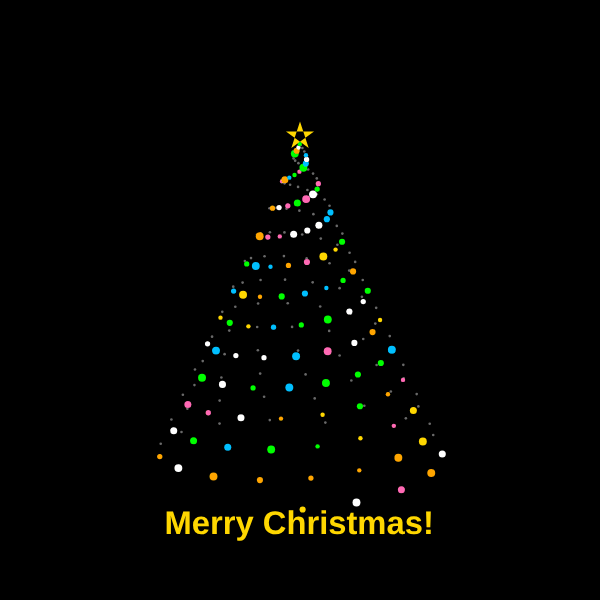
The full code (59 lines)
import turtle
import random
import math

screen = turtle.Screen()
screen.setup(600, 600)
screen.bgcolor("black")
screen.tracer(0)
pen = turtle.Turtle()
pen.hideturtle()
pen.penup()

colors = ["gold", "orange", "hotpink", "deepskyblue", "white", "lime"]
# each particle: [height (0 is the bottom of the tree, 1 the top), angle on its circle, color]
# the particles wind up the tree along two spirals
count = 200
particles = []
for i in range(count):
    h = i / count
    particles.append([h, h * 2 * math.pi * 6 + (i % 2) * math.pi, random.choice(colors)])
frame = 0


def step():
    global frame
    pen.clear()
    # the whole tree turns a little every frame
    turn = frame * 0.05
    for p in particles:
        # the higher, the smaller the circle: that is the shape of a Christmas tree
        r = 170 * (1 - p[0])
        a = p[1] + turn
        # the circle is squashed into an ellipse, so it looks like a solid tree seen from the side
        pen.goto(r * math.cos(a), -190 + p[0] * 370 + r * math.sin(a) * 0.3)
        if math.sin(a) < 0:
            # a particle that has come round to the front: big and bright, its size random, so it twinkles
            pen.dot(random.randint(5, 9), p[2])
        else:
            # a particle at the back: small and dim
            pen.dot(3, "dimgray")
    # the star on top
    pen.goto(-16, 192)
    pen.setheading(0)
    pen.color("gold")
    pen.begin_fill()
    for i in range(5):
        pen.forward(32)
        pen.right(144)
    pen.end_fill()
    pen.goto(0, -275)
    pen.write("Merry Christmas!", align="center", font=("Arial", 28, "bold"))
    screen.update()
    frame += 1
    if frame < 300:
        screen.ontimer(step, 50)


step()
turtle.done()
How it is drawn
Each particle keeps three things: [height, angle, color]. The height goes from 0 (the bottom of the tree) to 1 (the top); the angle grows with the height, so the particles wind up along a spiral. (i % 2) * math.pi gives every other particle half a turn more: that makes two spirals.
The shape of the tree is one line: r = 170 * (1 - p[0]). The higher a particle, the smaller its circle, down to a point at the top.
Its place comes from math.cos(a) and math.sin(a): cos is left and right, sin is front and back. Front and back is multiplied by 0.3, so the circle is squashed into an ellipse and the tree looks solid, seen from the side.
Spinning is simple: every frame, frame * 0.05 is added to every angle. A particle with math.sin(a) < 0 has come round to the front and is a big bright dot (of a random size, so it twinkles); the others are at the back, small and dim.
Want to write it yourself? Start with these lessons:for loops →functions (def) →lists →
Questions
Is it the same as the particle trees with thousands of particles?
No. Those are mostly web page effects, with many more particles and a glow. This one uses turtle, which comes with Python: about 200 dots, short code, every line easy to follow, and it runs wherever Python is installed.
Does it run on my own computer?
Yes. With Python 3 installed, save it as tree.py and run python tree.py: a window opens and plays it (turtle comes with Python). The last line, turtle.done(), keeps the window open.
How do I make it spin forever?
The line if frame < 300 stops the animation after 300 frames (about 15 seconds). On your own computer, remove that if and call screen.ontimer(step, 50) every time: it then spins until you close the window. On this page an animation plays for 30 seconds at most.
How do I change the greeting or add a name?
Click Edit, change the text inside write(...) in the playground and run it again.
 Animated Christmas treeLights that blink, snow that falls
 Christmas treeLights, a star, snow and a greeting
 FireworksAn animation, frame by frame
 SnowflakeThe Koch curve, folded finer and finer